Showing posts with label Premium App. Show all posts
Showing posts with label Premium App. Show all posts
Remote Phone
Look for missed incoming calls in your call log, read your SMS and use your phone contacts for dialing and creating SMS messages. All from your Windows desktop via Wi-Fi or Bluetooth....
Ideal in conjunction with a Bluetooth headset. You can leave your phone in the docking station while managing your calls.
The additional Microsoft Office integration allows simple dialing and SMS creation direct from Outlook, Word and Excel.
Also look for the 15 day trial version "Remote Phone Call Trial".
Simply the remote control for your mobile phone!
CallCenter features (app running on your PC):
Shows phone contacts
Shows call log
Allows dialing contacts, call log entries and entered numbers
Writing and reading SMS messages
Contact search
Answer incoming calls
Popup for incoming calls and SMS messages
Manage audio settings
Hotkey for dialing numbers from the clipboard
Hotkey for accepting incoming calls
Handle "tel" and "callto" ULRs
Auto start at windows login
CallCenter Microsoft Office integration:
Allows dialing selected numbers using the context menu of the text editor (Outlook, Excel and Word)
Allows calling email sender and recipients with help of contact information (Outlook)
RemotePhone features (app running on your phone):
Auto start with Wi-Fi or Bluetooth
Acoustic signal on connect
Show connection status
Send or download client installation package
to your Microsoft Windows PC
System requirements:
a Microsoft Windows PC (XP or newer)
a Wi-Fi (WLAN) environment or a Bluetooth* enabled PC
Supported Bluetooth stacks: default Microsoft stack, WIDCOMM stack
The PC application CallCenter offers a programming interface (API), which allows developers the use of the remote control features within arbitrary own applications. The SDK together with a sample can be found in the subdirectory "SDK" within the installation directory on your PC.
What's in this version : (Updated : Jan 30, 2014)
new: Extended features for rooted phones (see www.justremotephone.com)
new: WiFi network filter for autostart feature
fixed: Answering calls not possible on Android 5.0
fixed: Some special characters like # cannot be dialed
fixed: Client setup sometimes fails with DLL not found
Screenshot:
.jpg)
.jpg)
.jpg)


Look for missed incoming calls in your call log, read your SMS and use your phone contacts for dialing and creating SMS messages. All from your Windows desktop via Wi-Fi or Bluetooth....
Ideal in conjunction with a Bluetooth headset. You can leave your phone in the docking station while managing your calls.
The additional Microsoft Office integration allows simple dialing and SMS creation direct from Outlook, Word and Excel.
Also look for the 15 day trial version "Remote Phone Call Trial".
Simply the remote control for your mobile phone!
CallCenter features (app running on your PC):
Shows phone contacts
Shows call log
Allows dialing contacts, call log entries and entered numbers
Writing and reading SMS messages
Contact search
Answer incoming calls
Popup for incoming calls and SMS messages
Manage audio settings
Hotkey for dialing numbers from the clipboard
Hotkey for accepting incoming calls
Handle "tel" and "callto" ULRs
Auto start at windows login
CallCenter Microsoft Office integration:
Allows dialing selected numbers using the context menu of the text editor (Outlook, Excel and Word)
Allows calling email sender and recipients with help of contact information (Outlook)
RemotePhone features (app running on your phone):
Auto start with Wi-Fi or Bluetooth
Acoustic signal on connect
Show connection status
Send or download client installation package
to your Microsoft Windows PC
System requirements:
a Microsoft Windows PC (XP or newer)
a Wi-Fi (WLAN) environment or a Bluetooth* enabled PC
Supported Bluetooth stacks: default Microsoft stack, WIDCOMM stack
The PC application CallCenter offers a programming interface (API), which allows developers the use of the remote control features within arbitrary own applications. The SDK together with a sample can be found in the subdirectory "SDK" within the installation directory on your PC.
What's in this version : (Updated : Jan 30, 2014)
new: Extended features for rooted phones (see www.justremotephone.com)
new: WiFi network filter for autostart feature
fixed: Answering calls not possible on Android 5.0
fixed: Some special characters like # cannot be dialed
fixed: Client setup sometimes fails with DLL not found
Screenshot:
Instant Heart Rate - Pro V2.0
Instant Heart Rate is the most accurate Heart Rate Monitor app for any smartphone and it does not need any external hardware.
Use it for optimizing your exercise and to track your progress.
Install it now and keep fit.

Accuracy is constantly tested by fitness coaches, nurses, doctors, EMTs and 5 million users like you.
Place the tip of your index finger on phone’s camera and in a couple of seconds your Heart Rate will be shown.
A real-time chart will show your every heart beat.
It uses your phones built-in camera to track color changes on the fingertip that are directly linked to your pulse. This is the same technique that medical pulse oximeters use.
Now you have a chance to track your fitness and health every-time with just your phone.
Your resting heart rate gives you a view into your hearts fitness. The fitter you get the lower your heart rate will be.
Enables:
✓ Heart rate measurements
✓ Real time PPG graph - see your every heart beat
✓ History
.jpg)
.jpg)
.jpg)
.jpg)
Instant Heart Rate is the most accurate Heart Rate Monitor app for any smartphone and it does not need any external hardware.
Use it for optimizing your exercise and to track your progress.
Install it now and keep fit.
Accuracy is constantly tested by fitness coaches, nurses, doctors, EMTs and 5 million users like you.
Place the tip of your index finger on phone’s camera and in a couple of seconds your Heart Rate will be shown.
A real-time chart will show your every heart beat.
It uses your phones built-in camera to track color changes on the fingertip that are directly linked to your pulse. This is the same technique that medical pulse oximeters use.
Now you have a chance to track your fitness and health every-time with just your phone.
Your resting heart rate gives you a view into your hearts fitness. The fitter you get the lower your heart rate will be.
Enables:
✓ Heart rate measurements
✓ Real time PPG graph - see your every heart beat
✓ History
Screenshot:
Material Things Lollipop Theme
an icon theme for your android phone or tablet based on material design and wallpapers inspired by android lollipop. Color up your display with some simple, clean material Icons and lollipop wallpapers.
 Features:
1350+ Hand-crafted HD icons
75+ HD wallpapers - Hosted on the cloud. Choose and save the ones you want. (All wallpapers shown are included)
Muzei support for rotating wallpapers
New Icons added constantly
All material wallpapers shown are included!
XXXHDPI high definition icons included for super large HD screens. All Icons are 192x192.
14 Customized material/lollipop designed wallpapers. Wallpapers are 3D renders inspired by the lollipop theme and material design.
Contains over 1350 different clean, flat and material design/lollipop-based icons with many variations of default icons such as phone, contacts, camera, etc.
Wallpaper chooser comes installed. Browse and download via the cloud.
Integrated icon request or easy link to request icons via a contact form.
Clean, material, lollipop icons go with any background.
Constantly updated along with my other icon packs!
Compatible with: (There are free versions of these. Dev recommends Nova Launcher)
ADW Launcher - Recommended size: 110%
Action Launcher
Apex Launcher - Recommended size: 110%
Atom Launcher
Aviate Launcher
Go Launcher
Holo Launcher (through launcher settings)
Inspire Launcher
KK Launcher
Lucid Launcher
Next Launcher
Nine Launcher
Nova Launcher - Recommended size: 110%
Solo Launcher
Smart Launcher
TSF
How to apply the theme:
Open the app after installing
Press "Apply Theme"
Select Launcher type
Install via Launcher:
Apex Launcher: Apex settings > Theme settings
Nova Launcher: Nova Settings > Look and feel > Icon Theme
ADW Launcher: On home screen, press "Menu" > More > ADWSettings > Themes Preferences > Select theme
- Holo Launcher: Onhome screen, press "Menu" > Launcher Settings > Appearance Settings > Icon Pack > Select Theme
Screenshot:
.png)
.png)
.png)

an icon theme for your android phone or tablet based on material design and wallpapers inspired by android lollipop. Color up your display with some simple, clean material Icons and lollipop wallpapers.
1350+ Hand-crafted HD icons
75+ HD wallpapers - Hosted on the cloud. Choose and save the ones you want. (All wallpapers shown are included)
Muzei support for rotating wallpapers
New Icons added constantly
All material wallpapers shown are included!
XXXHDPI high definition icons included for super large HD screens. All Icons are 192x192.
14 Customized material/lollipop designed wallpapers. Wallpapers are 3D renders inspired by the lollipop theme and material design.
Contains over 1350 different clean, flat and material design/lollipop-based icons with many variations of default icons such as phone, contacts, camera, etc.
Wallpaper chooser comes installed. Browse and download via the cloud.
Integrated icon request or easy link to request icons via a contact form.
Clean, material, lollipop icons go with any background.
Constantly updated along with my other icon packs!
Compatible with: (There are free versions of these. Dev recommends Nova Launcher)
ADW Launcher - Recommended size: 110%
Action Launcher
Apex Launcher - Recommended size: 110%
Atom Launcher
Aviate Launcher
Go Launcher
Holo Launcher (through launcher settings)
Inspire Launcher
KK Launcher
Lucid Launcher
Next Launcher
Nine Launcher
Nova Launcher - Recommended size: 110%
Solo Launcher
Smart Launcher
TSF
How to apply the theme:
Open the app after installing
Press "Apply Theme"
Select Launcher type
Install via Launcher:
Apex Launcher: Apex settings > Theme settings
Nova Launcher: Nova Settings > Look and feel > Icon Theme
ADW Launcher: On home screen, press "Menu" > More > ADWSettings > Themes Preferences > Select theme
- Holo Launcher: Onhome screen, press "Menu" > Launcher Settings > Appearance Settings > Icon Pack > Select Theme
Screenshot:
Notific
It will automatically turn the screen on and display your notification in an easily accessible tabbed dialogue. It will also show notification quick action buttons if expansion is enabled.
If the phone is in pocket, don't worry. Notific is intelligent enough to understand that and will not turn on the screen. But if you take out the phone from your pocket within 10secs (customizable) it will turn on the screen for you.
Version 2.0 comes with a new Android Wear inspired theme (4.4+), in case you don't like the dark HOLO style.
Notific doesn't impact battery life as it will only use the proximity sensor for 10 secs.
The memory usage is highly optimized (2-10MB) and doesn't use 50MB+ as in other notification apps.
The multitude of notifications we get every day are probably the most sensitive information for some and these deserve the utmost privacy.
That's why Notific comes with absolutely no private data mining. No crash data, No Google analytics collection.
It doesn't require connecting to Internet, so you can be sure that there's no way your information goes out of your device.
The app is in active development and will get frequent updates and lots of features are in pipeline, including privacy mode and themes.
Proximity sensor values are calibrated for Nexus devices by default. If you have problems with the sensor on Galaxy or Xperia devices, try calibrating the sensor from app settings or TurnOff Pocket Mode
Screenshot:
.png)
.png)
.png)
.png)
It will automatically turn the screen on and display your notification in an easily accessible tabbed dialogue. It will also show notification quick action buttons if expansion is enabled.
If the phone is in pocket, don't worry. Notific is intelligent enough to understand that and will not turn on the screen. But if you take out the phone from your pocket within 10secs (customizable) it will turn on the screen for you.
Version 2.0 comes with a new Android Wear inspired theme (4.4+), in case you don't like the dark HOLO style.
Notific doesn't impact battery life as it will only use the proximity sensor for 10 secs.
The memory usage is highly optimized (2-10MB) and doesn't use 50MB+ as in other notification apps.
The multitude of notifications we get every day are probably the most sensitive information for some and these deserve the utmost privacy.
That's why Notific comes with absolutely no private data mining. No crash data, No Google analytics collection.
It doesn't require connecting to Internet, so you can be sure that there's no way your information goes out of your device.
The app is in active development and will get frequent updates and lots of features are in pipeline, including privacy mode and themes.
Proximity sensor values are calibrated for Nexus devices by default. If you have problems with the sensor on Galaxy or Xperia devices, try calibrating the sensor from app settings or TurnOff Pocket Mode
Screenshot:
OfficeSuite 8 + PDF to Word Premium
OFFICESUITE 8 OUT NOW! WITH THIS MAJOR UPDATE YOU GET:
Completely new desktop similar user interface and experience to help you easily switch working on your mobile device
Track changes (Premium feature)
PDF security and editing features (digital signatures, permissions management, add text to PDF, annotations)
More
The only office solution allowing you to convert PDF files to Word, Excel or ePUB (available in OfficeSuite Premium).
PCMAG EDITOR'S CHOICE AND GOOGLE PLAY EDITOR’S CHOICE MOBILE OFFICE
OfficeSuite is the trusted leader for reliably editing Microsoft Office and PDF documents and attachment on Android.
Installed on over 160 million devices in 205 countries
Over 55,000 registrations per day
No. 1 app in Google Play Business category
45 million downloads and over 280,000 reviews on Google Play
Features:
Ability to view, create and edit complex Microsoft Office and PDF files and attachments with a single complete feature-rich application.
Full compatibility with Microsoft formats DOC, DOCX, DOCM, , XLS, XLSX, XLSM, PPT, PPTX, PPS, PPSX, PPTM, PPSM and support of common formats as PDF, RTF, TXT, LOG, CSV, EML, ZIP; Open Office formats available as in-app purchase – ODT, ODS and ODP in OfficeSuite Premium.
Intact document formatting and layout and ability to create advanced documents on the device.
Rich editing features for advanced document creation and touch-up on the device.
Easy file access to local, remote files and email attachment.
Integrated File Browser allowing you to access and manage your local and remote storage files; Quick access to Recent files, My documents folders and document templates.
Sharing via could, email, Bluetooth, Wi-Fi Direct.
Integration with various cloud services as Box, DropBox, Google Drive, OneDrive and SugarSync.
Security features - work with password protected files (available in OfficeSuite Premium).
Spell checker, predictive text keyboard, PDF camera scanner, Microsoft compatibility Font Pack and many more features available as in-app upgrade to OfficeSuite Premium.
Save to PDF (in OfficeSuite Premium). Convert PDF files to Word, Excel or ePUB (available in OfficeSuite Premium)
Available in 56 languages.
Optimized for work with keyboards with support of multiple keyboard shortcuts and moving of objects and selections.
A number of manufacturers such as Sony, Amazon, ACER, Alcatel, Toshiba, Sharp, Barnes and Noble, Archos, Polaroid, ViewSonic, Kyocera and Kobo trusted MobiSystems and preloaded OfficeSuite worldwide.
What's in this version : (Updated : Oct 31, 2014)
New desktop similar user interface and experience
PhotoSuite integrated in OfficeSuite
Word module:
Track changes
Document author support
Predefined page margins
Comments visualized as balloons
Page color support
Excel module - additional font support
PowerPoint module - text formatting
PDF module:
Permissions management: user password, owner password, printing and annotations
Digital signatures and signature profiles
More annotation types
Screenshot:
.png)
.png)
.png)

CallRecorder Full

This program records phone calls from the phone line on some phones. Such recording is not usually available out-of-the-box, it needs hardware support in your OS kernel and root access. If you have an HTC device, you're in clover if you've got a custom ROM. Otherwise, please visit the xda site, there're plenty.
Basically any device is supported, provided that it's based on a Qualcomm chip, say, their Snapdragons, etc. If your device has no such support, the program still records phone calls, but you need to select Android API in preferences and the recording will most likely proceed from the mike, not from the line. Please feel free to make any comments or send suggestions.
The list of supported devices
HTC Desire
HTC HD2
Google Nexus One
HTC Desire HD
HTC Desire Z
HTC Desire S
HTC Incredible S
HTC Thunderbolt
HTC Sensation
HTC EVO 3D (CDMA)
HTC Hero
HTC Wildfire
Acer Liquid mt
Dell Streak
ZTE Blade
HighScreen Cosmo
Acer Liquid
Sony Ericsson XPERIA ray
Sony Ericsson XPERIA arc
Samsung Galaxy S II X (SGH-T989)
Requires the kernel with 2-way call recording patch and ROOT permissions
Use standard API for recording (may record from the mic):
Samsung GT-I9100 Galaxy S II (Doesn't work on Android 4 ICS, Preferences: Audio source - voice uplink, and voice downlink when BT headset is connected(it will record only other side, but it's better then nothing))
Screenshot:
.png)
.png)
.png)

This program records phone calls from the phone line on some phones. Such recording is not usually available out-of-the-box, it needs hardware support in your OS kernel and root access. If you have an HTC device, you're in clover if you've got a custom ROM. Otherwise, please visit the xda site, there're plenty.
Basically any device is supported, provided that it's based on a Qualcomm chip, say, their Snapdragons, etc. If your device has no such support, the program still records phone calls, but you need to select Android API in preferences and the recording will most likely proceed from the mike, not from the line. Please feel free to make any comments or send suggestions.
The list of supported devices
HTC Desire
HTC HD2
Google Nexus One
HTC Desire HD
HTC Desire Z
HTC Desire S
HTC Incredible S
HTC Thunderbolt
HTC Sensation
HTC EVO 3D (CDMA)
HTC Hero
HTC Wildfire
Acer Liquid mt
Dell Streak
ZTE Blade
HighScreen Cosmo
Acer Liquid
Sony Ericsson XPERIA ray
Sony Ericsson XPERIA arc
Samsung Galaxy S II X (SGH-T989)
Requires the kernel with 2-way call recording patch and ROOT permissions
Use standard API for recording (may record from the mic):
Samsung GT-I9100 Galaxy S II (Doesn't work on Android 4 ICS, Preferences: Audio source - voice uplink, and voice downlink when BT headset is connected(it will record only other side, but it's better then nothing))
Screenshot:
PlayerPro Music Player
Key Features:
Browse and play your music by albums, artists, genres, songs, playlists, folders, and album artists.
Video browser and player.
Automatically downloads missing album artwork, artist pictures and genre illustrations.
Manually pick your preferred album artwork, artist pictures, genre illustrations from the Internet, the Gallery app, ID3 tags, or album folder.
Change the user interface of the Player by installing one of the 14 available SKINS, all for free.
Customize the layout, chosing between GRID or LIST views.
Read album and artist REVIEWS.
Download, search and and save LYRICS to your music files using standard ID3 tags.
Single and group TAG EDITING: title, album, artist, album artist, track, year, genre, comment. Formats supported: mp3, ogg, flac, wma, wav, m4a, mp4.
Mixable AUDIO EFFECTS for Android >2.3 devices: 5 band graphic EQUALIZER with default/customizable presets (edit, rename, delete), STEREO WIDENING effect (virtualizer), REVERB effects (large hall, medium hall, plate, small room, medium room, large room), BASS BOOST effect, volume control.
Free additional DSP PLUGIN for Android <=2.2 or >=2.3 devices: 10 band graphic EQUALIZER with 15 default/customizable presets, PRE-AMP control, BASS BOOST control, volume control. Go to Settings > Audio and select "Download DSP pack" option to install the free plugin.
Dolby and SRS sound effects for HTC devices equipped with HTC sound enhancement (HTC desire HD, etc).
Music stats and SMART PLAYLISTS: Recently added, Top rated, Most played, Recently played, Least played. Build additional custom playlists using the SMART PLAYLIST EDITOR and the many different criteria it offers: album, artist, title, play/skip count, last played/added, rating, is a podcast, duration, year etc. All smart playlists are AUTO-UPDATED.
Import and export music history and ratings from your favorite desktop music player: Songbird, Winamp, Windows Media Player, MediaMonkey ...
Music folder selection.
Choice of 2 LOCK SCREEN widgets with many customization options: unlock slider, sound toggler, skip tracks using volume buttons, swipe gestures, background selection, controls selection, time display, skin selection ...
Choice of 5 different home screen WIDGETS (4x1, 2x2, 3x3, 4x4, 4x2). All widgets are customizable and skinnable: 6 different SKINS available, option to display artist picture instead of album artwork, option to display ratings, shuffle/repeat controls etc.
NOTIFICATION STATUS support: display album artwork, title, album and artist, play/pause, skip forward and stop CONTROLS (ICS only) in notification status.
Supported SCROBBLERS: Simple Last.fm, Scrobble Droid, Official Last.fm app.
SLEEP TIMER with fade out.
SHARE text notifications, album/artist artwork on your favorite social networks: Twitter, Facebook, Gmail, Picassa etc.
HEADSET support. Customize long press and double/triple press actions.
Library wide SEARCH. VOICE search support.
SWIPE gestures (player: swipe album art to skip songs, browsers: swipe left to play next, swipe right to play last).
SHAKE IT feature: give your phone a shake to play next/previous song (e.g.: shake top to bottom or bottom to top to play next/previous song).
Create playlist SHORTCUTS.
APP2SD support.
Screenshot:
.jpg)
.jpg)
.jpg)
.jpg)
Key Features:
Browse and play your music by albums, artists, genres, songs, playlists, folders, and album artists.
Video browser and player.
Automatically downloads missing album artwork, artist pictures and genre illustrations.
Manually pick your preferred album artwork, artist pictures, genre illustrations from the Internet, the Gallery app, ID3 tags, or album folder.
Change the user interface of the Player by installing one of the 14 available SKINS, all for free.
Customize the layout, chosing between GRID or LIST views.
Read album and artist REVIEWS.
Download, search and and save LYRICS to your music files using standard ID3 tags.
Single and group TAG EDITING: title, album, artist, album artist, track, year, genre, comment. Formats supported: mp3, ogg, flac, wma, wav, m4a, mp4.
Mixable AUDIO EFFECTS for Android >2.3 devices: 5 band graphic EQUALIZER with default/customizable presets (edit, rename, delete), STEREO WIDENING effect (virtualizer), REVERB effects (large hall, medium hall, plate, small room, medium room, large room), BASS BOOST effect, volume control.
Free additional DSP PLUGIN for Android <=2.2 or >=2.3 devices: 10 band graphic EQUALIZER with 15 default/customizable presets, PRE-AMP control, BASS BOOST control, volume control. Go to Settings > Audio and select "Download DSP pack" option to install the free plugin.
Dolby and SRS sound effects for HTC devices equipped with HTC sound enhancement (HTC desire HD, etc).
Music stats and SMART PLAYLISTS: Recently added, Top rated, Most played, Recently played, Least played. Build additional custom playlists using the SMART PLAYLIST EDITOR and the many different criteria it offers: album, artist, title, play/skip count, last played/added, rating, is a podcast, duration, year etc. All smart playlists are AUTO-UPDATED.
Import and export music history and ratings from your favorite desktop music player: Songbird, Winamp, Windows Media Player, MediaMonkey ...
Music folder selection.
Choice of 2 LOCK SCREEN widgets with many customization options: unlock slider, sound toggler, skip tracks using volume buttons, swipe gestures, background selection, controls selection, time display, skin selection ...
Choice of 5 different home screen WIDGETS (4x1, 2x2, 3x3, 4x4, 4x2). All widgets are customizable and skinnable: 6 different SKINS available, option to display artist picture instead of album artwork, option to display ratings, shuffle/repeat controls etc.
NOTIFICATION STATUS support: display album artwork, title, album and artist, play/pause, skip forward and stop CONTROLS (ICS only) in notification status.
Supported SCROBBLERS: Simple Last.fm, Scrobble Droid, Official Last.fm app.
SLEEP TIMER with fade out.
SHARE text notifications, album/artist artwork on your favorite social networks: Twitter, Facebook, Gmail, Picassa etc.
HEADSET support. Customize long press and double/triple press actions.
Library wide SEARCH. VOICE search support.
SWIPE gestures (player: swipe album art to skip songs, browsers: swipe left to play next, swipe right to play last).
SHAKE IT feature: give your phone a shake to play next/previous song (e.g.: shake top to bottom or bottom to top to play next/previous song).
Create playlist SHORTCUTS.
APP2SD support.
Screenshot:
Advanced Download Manager Pro

Features:
download up to three files simultaneously;
accelerated download by using multithreading (9 parts)
interception of links from the browser and clipboard;
icon of the program and downloading progress in the notification panel;
backup list of downloads and settings on SD card;
completion notification by sound and vibration;
resume after reconnection or program restart;
save different file types in different folders;
built-in browser for sites with registration;
plan files download on a schedule;
widget on your home screen;
site manager.
Add links from browser:
press on link and from the window "Complete action using" select ADM (supported by Stock Browser, Dolphin, Boat Browser, Chrome)
long press on a link to display the context menu, press "Share link" and from the window "Share via" select ADM (supported by Firefox, Skyfire, Stock Browser, Dolphin, Boat Browser)
copy the link and the service will intercept the link (supported by Maxthon)
Controls:
press on the download to start/stop the process;
press on the completed download to open the file;
long press on download to display the context menu.
YouTube is not supported under the rules of Google.
What's in this version : (Updated : Oct 20, 2014)
Fixed crash after first launch for some builds of KitKat (second launch to be successful)
Added new option "Planning - Disable notifications for silent mode"
Improved option "Interface - Buttons in menu" to hide buttons in top menu.
Icons downloads is ongoing in notification panel.
Updated options in Settings:
Notifications - "Inf. about downloading" and "Vibration"
Automation - "Autostop service" and "After completion"
Interface - "Download speed"
Screenshot:
.webp)
.webp)

Features:
download up to three files simultaneously;
accelerated download by using multithreading (9 parts)
interception of links from the browser and clipboard;
icon of the program and downloading progress in the notification panel;
backup list of downloads and settings on SD card;
completion notification by sound and vibration;
resume after reconnection or program restart;
save different file types in different folders;
built-in browser for sites with registration;
plan files download on a schedule;
widget on your home screen;
site manager.
Add links from browser:
press on link and from the window "Complete action using" select ADM (supported by Stock Browser, Dolphin, Boat Browser, Chrome)
long press on a link to display the context menu, press "Share link" and from the window "Share via" select ADM (supported by Firefox, Skyfire, Stock Browser, Dolphin, Boat Browser)
copy the link and the service will intercept the link (supported by Maxthon)
Controls:
press on the download to start/stop the process;
press on the completed download to open the file;
long press on download to display the context menu.
YouTube is not supported under the rules of Google.
What's in this version : (Updated : Oct 20, 2014)
Fixed crash after first launch for some builds of KitKat (second launch to be successful)
Added new option "Planning - Disable notifications for silent mode"
Improved option "Interface - Buttons in menu" to hide buttons in top menu.
Icons downloads is ongoing in notification panel.
Updated options in Settings:
Notifications - "Inf. about downloading" and "Vibration"
Automation - "Autostop service" and "After completion"
Interface - "Download speed"
Screenshot:
VivaVideo Pro: Video Editor
Recording the favorite moments and making the beautiful movies just by mobile phone become so easy from now on!
Pro version have followings extra features:
Watermark-free videos
Unlimited video length
★New features
Support custom font for adding title
VivaVideo makes many No.1 on Android for a movie maker app:
#1 video camera app to support multi capture modes!
#1 video editor app to have multi trimmer for single video!
#1 video editor app to support video PIP feature
#1 video editor app to support multi title adding with animated bubble style!
#1 video editor app to support multi music and dubbing adding!
#1 video editor app to have more themes, effects, titles and transitions downloads for FREE!
Key Features:
Creative & Fun video cam
First video camera on Android to support multi capture modes: normal/FX/funny/music video/fast-motion/slow-motion
Built-in 60+ cool live video effects and more can be downloaded for FREE!
Unique storyboard shooting style to tell your own story easily.
Quick photo movie maker
Create the great video slideshow from your album less than one minute!
Video PIP(Picture in Picture) maker
Merge clips with stylish templates, more funny and creative
Easy but Powerful video editor
Provide quick & professional editing modes for normal and pro users
Multi trimmer for single video
Storyboarding editing, easy to merge videos and make the montage.
One click to enhance your videos using stylish themes
Highlight your videos with filters, FX, transitions, titles, music and live dubbing.
All editing operations can be instant previewed in WYSIWYG way
Editing session can be saved for later
More themes, effects, filters, titles and transitions can be downloaded for FREE!
Export and share
Export your videos to the gallery
Share your masterpieces to facebook, youtube, instagram, vine, email and etc
Screenshot:
.jpg)
.jpg)
.jpg)
.jpg)
Recording the favorite moments and making the beautiful movies just by mobile phone become so easy from now on!
Pro version have followings extra features:
Watermark-free videos
Unlimited video length
★New features
Support custom font for adding title
VivaVideo makes many No.1 on Android for a movie maker app:
#1 video camera app to support multi capture modes!
#1 video editor app to have multi trimmer for single video!
#1 video editor app to support video PIP feature
#1 video editor app to support multi title adding with animated bubble style!
#1 video editor app to support multi music and dubbing adding!
#1 video editor app to have more themes, effects, titles and transitions downloads for FREE!
Key Features:
Creative & Fun video cam
First video camera on Android to support multi capture modes: normal/FX/funny/music video/fast-motion/slow-motion
Built-in 60+ cool live video effects and more can be downloaded for FREE!
Unique storyboard shooting style to tell your own story easily.
Quick photo movie maker
Create the great video slideshow from your album less than one minute!
Video PIP(Picture in Picture) maker
Merge clips with stylish templates, more funny and creative
Easy but Powerful video editor
Provide quick & professional editing modes for normal and pro users
Multi trimmer for single video
Storyboarding editing, easy to merge videos and make the montage.
One click to enhance your videos using stylish themes
Highlight your videos with filters, FX, transitions, titles, music and live dubbing.
All editing operations can be instant previewed in WYSIWYG way
Editing session can be saved for later
More themes, effects, filters, titles and transitions can be downloaded for FREE!
Export and share
Export your videos to the gallery
Share your masterpieces to facebook, youtube, instagram, vine, email and etc
Screenshot:
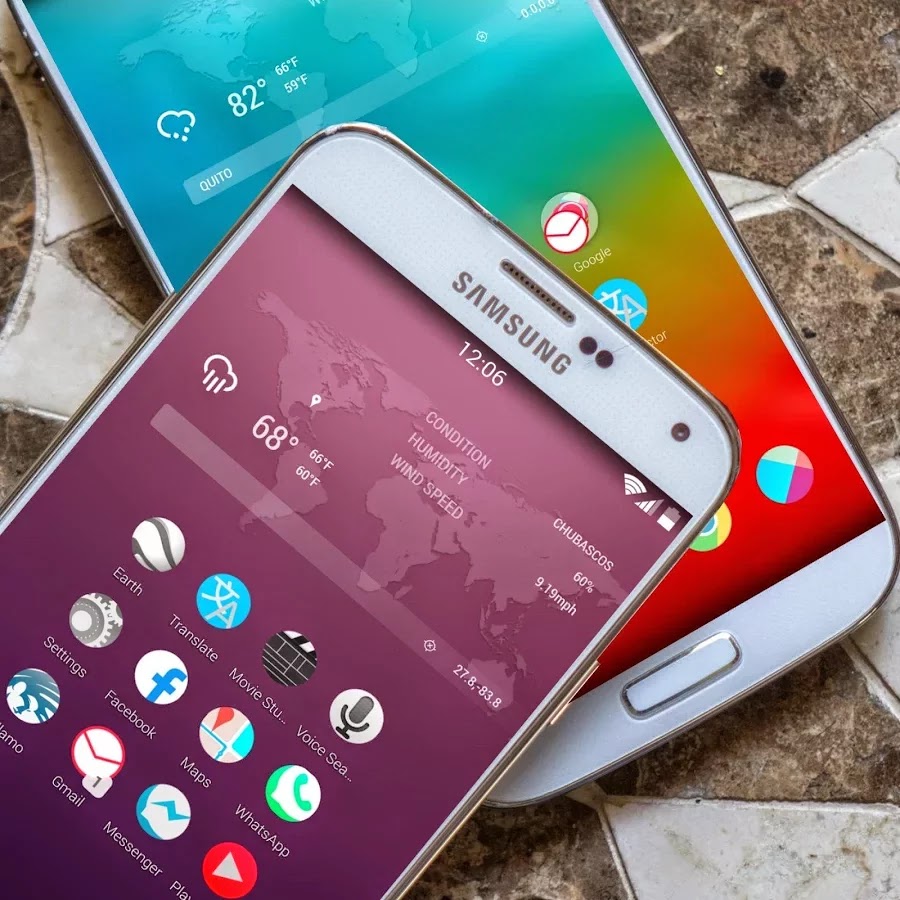
AERON HD Theme Nova, ADW, GO play.google.comsolstice.iconpack
1900+ Icons

Aeron is a subtle, minimalistic & elegant theme created after months of hard work.
It adds the liveliness of icons back to your device.
PLEASE READ THIS BEFORE DOWNLOADING!
This is Theme AERON HD. This is an icon pack for many Populars Launcher . As Apex Launcher, Nova Launcher, ADW, Holo, Go launcher, Action Launcher, and others. Also compatible.
Works with Launcher:
Nova
Apex
ADW
Inspire
Smart
Atom
Aviate
Solo
S Launcher
Slide
Winterboard
KK Launcher
Mini Launcher
Holo Launcher
Action Launcher Pro
Go Launcher (icons only)
Unicon only Icon
Walpaper design and resolution
Recommended Launcher system according to your android.
Nova Launcher from Android 4.0 to the current.
ADW from android 1.6 to the current.
HOLO Launcher works from android 2.3 with a style “Holo” as the current andrid the most recommended for best effect on older phones.
Go Launcher from Gingerbread to the current.
This is not an application, you need a pitcher like Go, Nova, Apex, Holo, ADW launcher and other custom themes that allow changing icons ,
if you are not sure which launcher to use according to your phone send us an email and we will help you choosing an better customization for you either phone or tablet
ATTENTION
This is NOT a standalone app, you need a launcher such as Go, Apex, Nova, etc that allow custom themes.
Installation Nova Launcher:
Nova Launcher free or Prime
Nova Settings ->
Look and feel ->
Icon theme->
choose a theme “Theme AERON HD.” and apply.
Enjoy.
Installation Apex Launcher :
Open Apex Settings->
Open Theme Settings->
Select and Apply “Theme AERON HD.” Theme
Installation Lockescreen:
Make sure GO Launcher EX or above and GOLocker Ex v1.68 has been installed;
Click Go locker ->
Menu select installed ->
choose a theme “Theme AERON HD.” and apply.
Enjoy.requester
What's in this version : (Updated : Aug 4)
fix icons Android L
25 icons more
fix calendar
add 30 icons more
fix icons oneplus
Screenshot:
.webp)
.webp)

1900+ Icons
Aeron is a subtle, minimalistic & elegant theme created after months of hard work.
It adds the liveliness of icons back to your device.
PLEASE READ THIS BEFORE DOWNLOADING!
This is Theme AERON HD. This is an icon pack for many Populars Launcher . As Apex Launcher, Nova Launcher, ADW, Holo, Go launcher, Action Launcher, and others. Also compatible.
Works with Launcher:
Nova
Apex
ADW
Inspire
Smart
Atom
Aviate
Solo
S Launcher
Slide
Winterboard
KK Launcher
Mini Launcher
Holo Launcher
Action Launcher Pro
Go Launcher (icons only)
Unicon only Icon
Walpaper design and resolution
Recommended Launcher system according to your android.
Nova Launcher from Android 4.0 to the current.
ADW from android 1.6 to the current.
HOLO Launcher works from android 2.3 with a style “Holo” as the current andrid the most recommended for best effect on older phones.
Go Launcher from Gingerbread to the current.
This is not an application, you need a pitcher like Go, Nova, Apex, Holo, ADW launcher and other custom themes that allow changing icons ,
if you are not sure which launcher to use according to your phone send us an email and we will help you choosing an better customization for you either phone or tablet
ATTENTION
This is NOT a standalone app, you need a launcher such as Go, Apex, Nova, etc that allow custom themes.
Installation Nova Launcher:
Nova Launcher free or Prime
Nova Settings ->
Look and feel ->
Icon theme->
choose a theme “Theme AERON HD.” and apply.
Enjoy.
Installation Apex Launcher :
Open Apex Settings->
Open Theme Settings->
Select and Apply “Theme AERON HD.” Theme
Installation Lockescreen:
Make sure GO Launcher EX or above and GOLocker Ex v1.68 has been installed;
Click Go locker ->
Menu select installed ->
choose a theme “Theme AERON HD.” and apply.
Enjoy.requester
What's in this version : (Updated : Aug 4)
fix icons Android L
25 icons more
fix calendar
add 30 icons more
fix icons oneplus
Screenshot:



.jpg)


.jpg)